YouTube has become the go-to platform for entertainment, education, and everything in between. With over 2 billion monthly active users, it's easy to see why so many creators are vying for attention on the platform. One of the most important elements of any YouTube video is the thumbnail. A thumbnail is the first impression a viewer has of your video, and it can be the deciding factor in whether or not they click to watch. But how do you create a thumbnail that stands out from the crowd and entices people to click? In this post, we'll reveal five secrets to creating killer YouTube thumbnails that will boost your views and help your channel grow. From using eye-catching images and bold text to considering color psychology and keeping it simple, we'll share tips and tricks to help you crack the code and create thumbnails that get results.
Why YouTube thumbnails matter
YouTube thumbnails are the gateway to your video content. They are the first thing a viewer sees before deciding whether or not to click on your video. Creating a great thumbnail can make all the difference in terms of clicks and views.
A well-designed thumbnail can grab a viewer's attention and entice them to watch your video, while a poor thumbnail can easily be overlooked, no matter how great your content is.
Not only do thumbnails help attract viewers, but they also help your videos stand out in search results and related videos. They give viewers a sneak peek into what they can expect from your content and can help set the tone for your video.
Think of your thumbnail as a book cover. Just like how a book cover can make or break a reader's decision to buy a book, a thumbnail can make or break a viewer's decision to click on your video.
In short, YouTube thumbnails matter because they are the first impression viewers have of your video. A great thumbnail can help you get more views, and ultimately, more engagement and subscribers.
The science of creating effective YouTube thumbnails
The creation of an effective YouTube thumbnail is both an art and a science. Understanding the science behind it is crucial to creating thumbnails that attract viewers and boost your views.
The first thing to consider is the size of your thumbnail. YouTube thumbnails are quite small and compact, which means that the image you choose needs to be clear and easy to read. It's recommended that you use an image that is at least 1280 x 720 pixels in size, with an aspect ratio of 16:9. This will ensure that your thumbnail looks great on all devices and platforms.
Next, it's important to consider the colors in your thumbnail. Bright, bold colors tend to attract the eye and draw viewers in, so try to use colors that are eye-catching and attention-grabbing.
Another important consideration is the text that you include in your thumbnail. The text should be clear, easy to read, and relevant to the video content. It's also important to keep the text short and sweet, as viewers tend to lose interest quickly if there is too much text on the thumbnail.
Finally, it's important to test and tweak your thumbnails to see what works best. Try different designs, colors, and text to see what resonates with your audience and generates the most views. By following these tips and experimenting with different thumbnail designs, you'll be able to create killer YouTube thumbnails that help boost your views and grow your channel.
The power of the right colors and contrasts
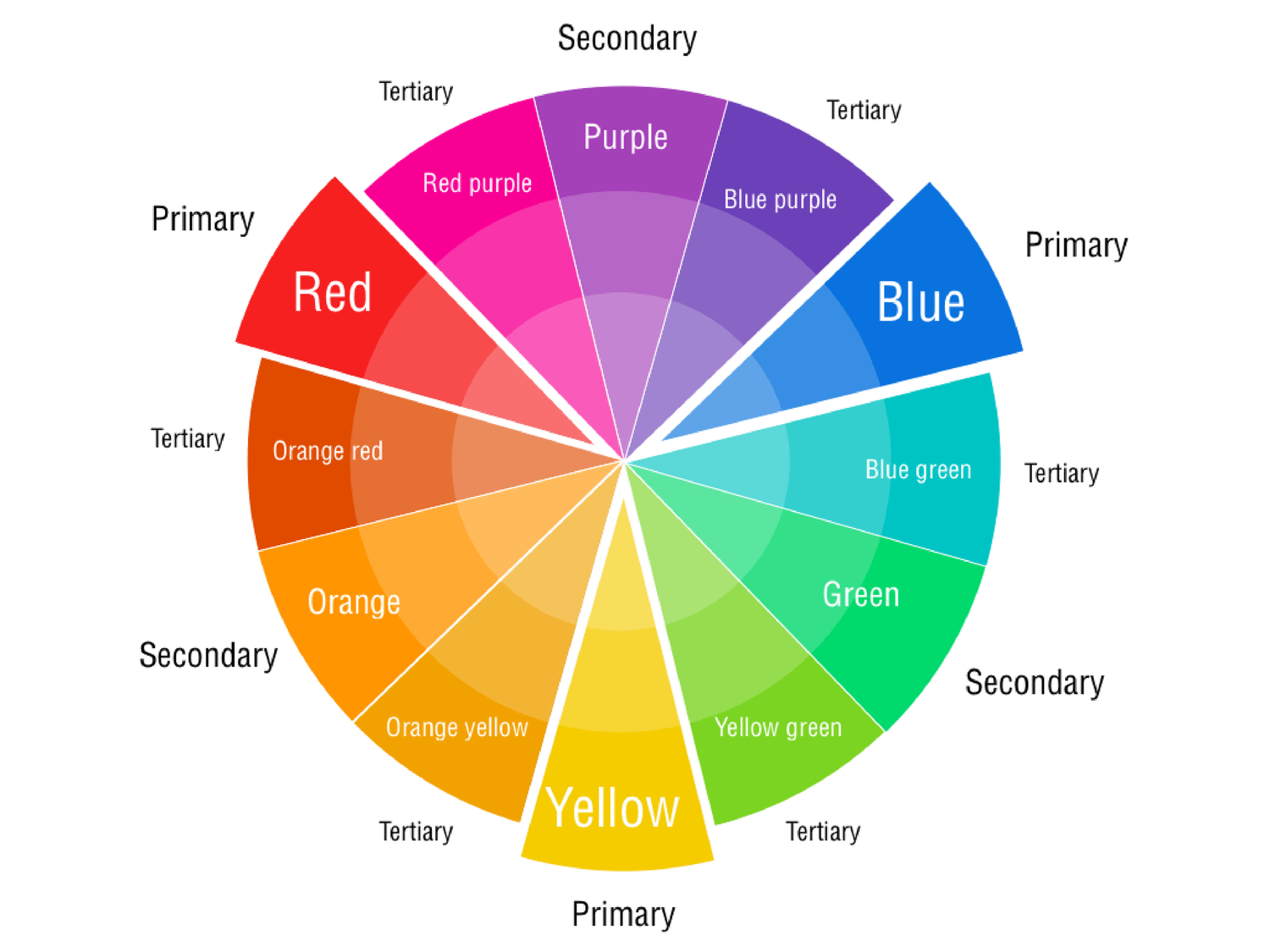
Colors play a powerful role in capturing the attention of viewers and potential subscribers. When choosing colors for your thumbnail, consider using bright and bold colors that are eye-catching and stand out on the platform. Using contrasting colors can also make an impact as it creates depth and helps the image pop.
For example, if you have a blue background, consider using a contrasting color like yellow for the text or image. This will create a visually appealing and attention-grabbing thumbnail that will stand out from the rest.
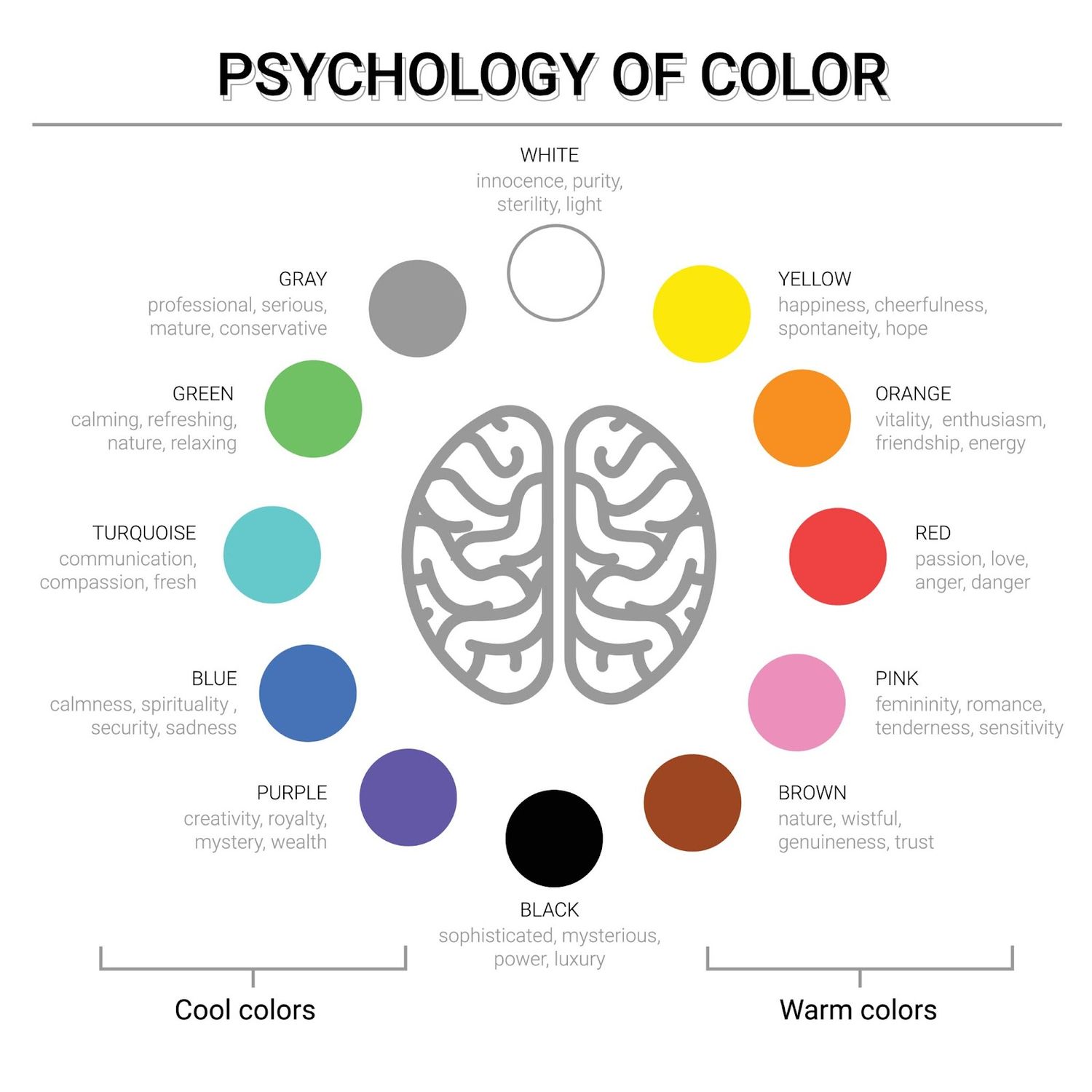
It's important to note that color psychology should also come into play when creating your thumbnail. Different colors evoke different emotions and can impact the viewer's overall perception of your video. For instance, red is often associated with excitement, passion, and urgency, while blue is associated with trust, calmness, and reliability. So, choose colors that complement the theme and message of your video.
Ultimately, using the right colors and contrasts in your thumbnail can make a significant difference in capturing the attention of viewers and driving more clicks and views to your video.
Space Refinery
AllBusinessTemplates
How to create engaging images that grab attention
Creating an engaging image that grabs the attention of your audience is a vital component in generating views on YouTube. A thumbnail that stands out from the crowd can be the difference between someone clicking on your video or scrolling past it.
Firstly, it's important to ensure your thumbnail accurately represents the content of your video. Misleading thumbnails may generate initial views but are unlikely to result in a positive audience reaction or repeat views.
Secondly, consider the use of contrasting colors to create a visually striking image. Bright colors or contrasting hues can help your thumbnail stand out and grab attention.
Another effective technique is to include text or a bold headline in your thumbnail. This can give your audience a clear idea of what your video is about and entice them to click through to watch.
Finally, avoid cluttering your thumbnail with too much information or imagery. A clean and simple design will be more visually appealing and easier for your audience to understand.
By following these simple tips, you can create engaging and eye-catching thumbnails that will help boost views on your YouTube channel.
5 Tips and tricks for designing attention-grabbing thumbnails
Designing attention-grabbing thumbnails is essential to boosting your views on YouTube. A thumbnail is the first thing that viewers see when they search for a video, so it's important to make it eye-catching and relevant to the content of the video.
Here are some tips and tricks for designing killer thumbnails:
1. Use high-quality images: Make sure that the images you use are high-quality and visually appealing. You can use screenshots from your video or create custom graphics that represent the content of your video.
2. Add text overlay: Adding text overlay to your thumbnail can help to grab the attention of viewers and give them an idea of what your video is about. Use bold, easy-to-read fonts and keep the text short and sweet.
3. Use contrasting colors: Using contrasting colors can help your thumbnail stand out from the crowd. Choose colors that complement each other and make sure the text is easy to read against the background.
4. Feature a person's face: If your video features a person, consider using a close-up of their face in the thumbnail. This can help to create a personal connection with the viewer and make them more likely to click on your video.
5. Test and optimize: Don't be afraid to experiment with different thumbnail designs to see what works best. Keep track of your click-through rates and make adjustments as needed to improve your performance over time.
By following these tips and tricks, you can create attention-grabbing thumbnails that will help to boost your views and grow your audience on YouTube.
Writing compelling headlines that work with your thumbnail
Creating killer YouTube thumbnails is not just about the visuals; it's also about the text that accompanies them. The text needs to be compelling and work in tandem with the image to grab the viewer's attention and entice them to click through to your video.
When crafting your headline, keep it short and sweet, ideally under 60 characters, as longer headlines may get cut off on certain devices. Use clear and concise language that accurately reflects the content of your video while also piquing the viewer's interest.
Consider using power words such as "proven," "ultimate," "secret," and "insane" to add a sense of urgency and excitement to your headline. Numbers and lists are also effective as they provide a sense of structure and help the viewer understand what they can expect from your content.
It's also important to make sure your headline and thumbnail work together seamlessly. The text should complement the image and not compete with it. Avoid using similar colors for both your text and background as this can make the text difficult to read.
In summary, your headline should be short, clear, and compelling, with power words and numbers to grab attention. Take into account the overall design of your thumbnail, making sure the text and visuals work together to create an irresistible click-worthy package.
The impact of quality on your thumbnail
When it comes to creating YouTube thumbnails, quality is key. The quality of your thumbnail can make a huge difference in how many views your video gets. A low-quality thumbnail can make your video look unprofessional and unappealing, while a high-quality thumbnail can draw viewers in and make them more likely to click on your video.
One of the best ways to ensure that your thumbnails are high-quality is to use high-resolution images. The higher the resolution of your image, the sharper and more detailed it will be. This will help your thumbnail stand out from the crowd and make it more visually appealing to viewers.
Another important factor to consider is the composition of your thumbnail. A well-composed thumbnail will be visually appealing and easy to understand at a glance. This means that you should choose images that are clear and easy to read, and that you should avoid clutter and unnecessary text.
Finally, it's important to remember that your thumbnail is the first impression that viewers will get of your video. This means that it's important to choose an image that accurately represents the content of your video and that will grab viewers' attention. If you can create a thumbnail that is both visually appealing and relevant to your video, you'll be well on your way to creating killer YouTube thumbnails that boost views.
The best tools for creating custom YouTube thumbnails
Creating custom YouTube thumbnails is not only essential for drawing views to your videos but also for establishing a brand identity. Luckily, there are numerous tools available to help you create stunning and professional-looking thumbnails easily and quickly.
Canva is one of the most popular tools for creating YouTube thumbnails. It's an easy-to-use online graphic design tool that offers a range of templates, designs, and stock photos to choose from. With Canva, you can create a custom thumbnail that reflects your brand and style.
Another great tool for creating custom thumbnails is Adobe Spark. This tool offers a range of templates and design options to help you create stunning thumbnails that stand out from the crowd. It also allows you to upload your own images and tweak the design until it's perfect.
PicMonkey is another popular tool that allows you to create custom thumbnails with ease. It offers a range of templates, design elements, and fonts to choose from, making it easy to create a thumbnail that represents your video content and style.
Finally, Visme is a versatile design tool that can help you create not just YouTube thumbnails but also other marketing materials such as infographics, social media graphics, and presentations. With a wide range of customizable templates and design options, Visme is a great tool for creating professional-looking thumbnails quickly and easily.
In conclusion, creating custom YouTube thumbnails is vital to attracting views and establishing a strong brand identity. With the help of these tools, you can create stunning and professional-looking thumbnails that help your videos stand out and draw in more viewers.
How to optimize your thumbnail for search
Optimizing your YouTube thumbnail for search is an essential aspect of ensuring that your video content gets the right amount of attention. It is important to first understand what your video is all about before creating a thumbnail that accurately represents it. This will make it easier for people to find your video when they search for it.
A great way to optimize your thumbnail for search is by using relevant keywords in the title and description of your video. This will help search engines to identify what your video is about and rank it accordingly.
Another way to optimize your thumbnail for search is by making it visually appealing. Use bright colors and contrasting hues to make your thumbnail stand out on the search results page. This will help to grab the attention of potential viewers and encourage them to click on your video.
It's also important to keep your thumbnail simple and easy to read. Avoid using too much text or small fonts that may be difficult to read on smaller screens. Instead, use bold and clear fonts that can be easily read even on smaller devices.
Lastly, consider using custom images or screenshots from your video as your thumbnail. This will give viewers a sneak peek of what they can expect to see in your video and make them more likely to click on it. By following these tips, you can create killer YouTube thumbnails that are optimized for search and help to boost your views.
Measuring the impact of your thumbnails on your channel's views and growth
Measuring the impact of your thumbnails on your channel's views and growth is important to ensure that your hard work is paying off. YouTube provides you with a range of metrics that you can use to track the performance of your thumbnails.
One of the most important metrics to look at is the click-through rate (CTR) of your videos. This metric tells you how many people clicked on your video after seeing the thumbnail. If your CTR is low, it may be an indication that your thumbnail is not appealing enough to your viewers.
Another important metric to look at is the audience retention rate. This tells you how long viewers stay on your video after clicking on it. If your audience retention rate is low, it may be an indication that your video content is not delivering on the promise made by your thumbnail.
You can also use YouTube Analytics to track the growth of your channel over time. Look at how your views, subscribers, and watch time have changed since you started implementing your new thumbnail strategy. If you see a significant increase in these metrics, it's a good indication that your thumbnails are working and you should continue to refine your strategy.
Remember, it's important to regularly measure and analyze the performance of your thumbnails to ensure that you're creating content that resonates with your viewers and keeps them coming back for more.
Hire Someone To Make it for You
Are you looking for a stunning YouTube thumbnail design that will help your content stand out from the crowd? Look no further! I will create an eye-catching thumbnail(s) that is sure to grab your audience's attention. I use high-quality images and the latest design techniques to ensure that your thumbnail looks amazing and accurately represents your content.
So why wait? Message me today and let's create a thumbnail that will take your YouTube channel to the NEXT LEVEL!
The End
We hope you enjoyed our guide to creating killer YouTube thumbnails. Thumbnails are critical to getting views on your videos, and with the tips we've provided, you'll be able to create eye-catching thumbnails that will get your videos noticed. Remember, the thumbnail is the first thing people see when they come across your video, so make it count! We can't wait to see your next video with a killer thumbnail that increases your views exponentially. Keep creating and sharing!